
San Juan Three-Day Release Finding
San Juan County offers no distinct 72-hour release page, three-day recent-releases view, or release-date-range control. The official Detainee Inquiry does something different. It searches bookings. Its Booking From and Booking To boxes relate to admission dates, so they cannot enumerate people who left during the last three days. A person booked weeks ago and released this weekend could vanish from a three-day booking-date query.
The inquiry remains valuable for a known name because it includes current and past detainees. Clear In Custody, locate the right booking, and open Booking History. The Release Date timestamp shows when that booking ended. Blank facility or custody cells indicate that the booking is no longer active in that facility, but they do not identify a community release or transfer destination.
Check San Juan 72-Hour Releases
A multi-day check starts by defining the question. Use the booking history when one person's name is known. Use a bounded public-records request when the goal is all completed county bookings within a weekend or other exact period. The Jail Releases: 24 Hours route is better when only the latest same-day activity matters.
- Open the official county inquiry and clear the default In Custody selection.
- Search by name, Subject Number, or Booking Number. Set booking dates wide enough to include the original admission, not just the last three days.
- Use date of birth, identifying numbers, facility assignment, and Multiple Bookings to select the correct result.
- Open each plausible booking. Read Booking History's Release Date and compare its timestamp with the chosen 72-hour window.
- If a complete window is required, submit an IPRA request using exact Mountain Time start and end points.
Keep a record of the interval used. “The weekend” can be vague, especially when a holiday extends the span. Exact timestamps give the custodian a clear boundary and reduce the risk that a late Friday or early Tuesday release is handled inconsistently.
San Juan 72-Hour Release Fields
No feed means there is no county-defined three-day results table. The public inquiry instead offers the fields below. Each answers a limited question. The actual release timestamp is the key field for deciding whether one completed booking falls within a 72-hour period.
| Available field | How to use it |
|---|---|
| Name, Subject Number, Booking Number | Match the person and the correct county booking. |
| Booking From and Booking To | Find admissions within a date span. These are not release filters. |
| In Custody and facility assignment | Distinguish current county placement from a past booking, without assuming the next destination. |
| Scheduled Release Date | Shows a changeable future date, not a completed release. |
| Booking History Release Date | Shows the actual administrative close time for the selected booking. |
| Bond, charges, docket, disposition | Adds case context but does not supply a discrete release reason. |
The successful manifest image from the official county inquiry shows why the interface must not be captioned as a 72-hour release feed.
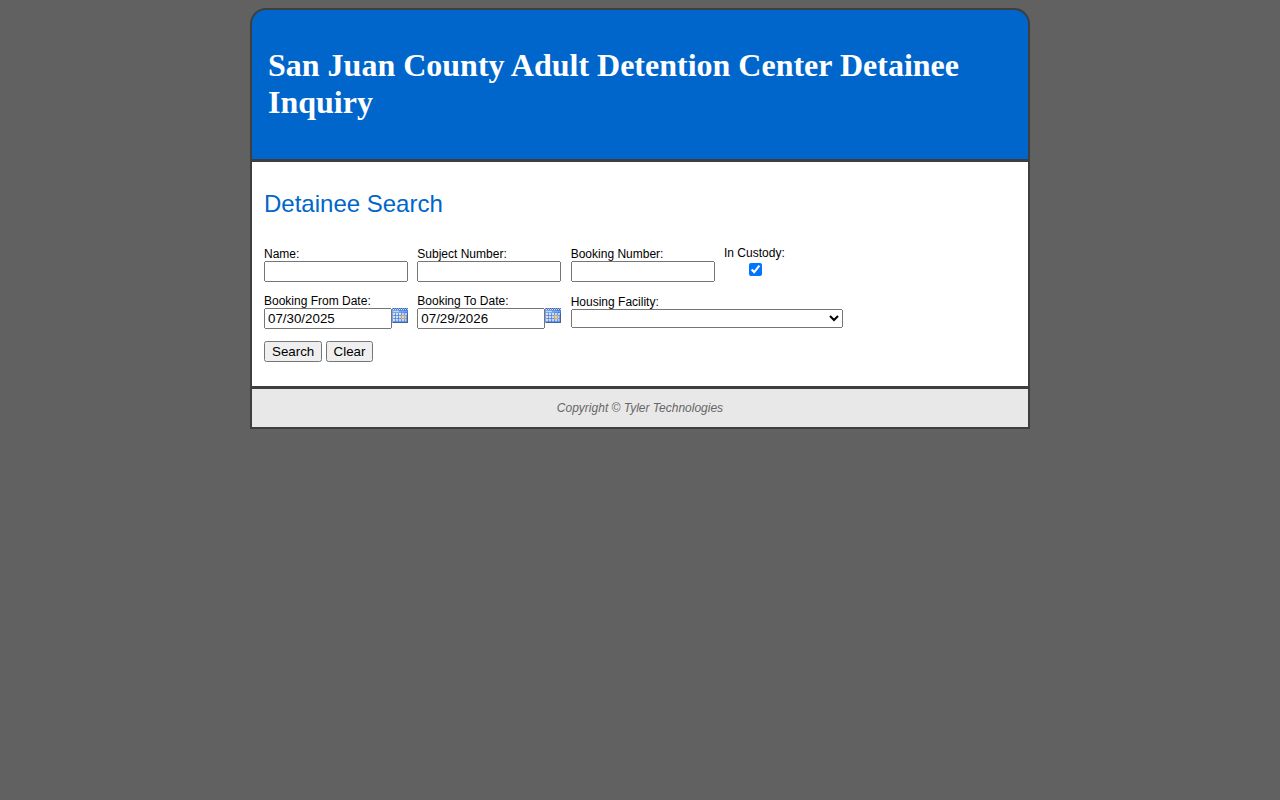
The captured screen contains booking-date inputs and the checked current-custody option. A release-window search requires different evidence: the detail-level release timestamp or an agency export filtered on that timestamp.
The Scheduled Release Date deserves a separate check. It points forward and can change before processing is complete. Even when the date falls within the chosen three-day span, it does not prove the person left. Return to the same booking after the event and look for Booking History's completed Release Date.
San Juan Weekend Release Windows
A 72-hour period is useful around weekends because it spans more than one calendar day. It can also absorb a delayed check after an office closure. Yet the county has not published a rule that releases occur only on business days. Adult Detention Center lobby closures on weekends and major holidays do not establish secure-facility release times. Never infer that a person stayed in custody merely because a public counter was closed.
Processing and online display can occur at different times. An order entered on Friday may be followed by jail processing, another hold check, or a transfer. A record visible on Monday may carry an earlier actual release timestamp. For that reason, compare the time within Booking History rather than the day a result was first observed. When the release method matters, obtain the movement or release sheet and the relevant court order.
Note: Define a holiday window with precise Mountain Time boundaries instead of assuming that a “three-day list” follows three calendar labels.
Request San Juan Three-Day Records
Use the county's JustFOIA portal for a complete 72-hour report. Ask for existing, releasable booking or movement records whose actual Release Date falls between the stated start and end timestamps. Request the subject or booking number, actual date and time, recorded release method, and receiving agency when transferred. Tell the custodian not to filter by booking date or scheduled release date.
IPRA does not generally make an agency create a new analysis. Phrase the request as an export or inspection of fields the county already maintains. Ask for electronic delivery and a fee estimate. The county says inspection should be allowed as soon as practicable and ordinarily within 15 days. If production cannot occur within three business days, written notice should explain the expected date or reason for denial.
Protected medical, juvenile, victim, security, or other exempt details may be removed. Ask for the segregable public fields rather than an entire case file. A focused three-day interval is easier to identify than an open-ended demand for every past release.
When a transfer is possible, include the receiving agency or destination among the requested fields. This keeps the report from treating every closed booking as a community release. If a field is withheld, ask the custodian to identify the legal basis and provide the remaining public portions.
San Juan Release Roster Limits
The current-and-past detainee database defaults to In Custody and opened with about a year of booking dates during research. Both details can mislead. The checked box hides released bookings until cleared. The starting date range is a convenience setting, not a published retention term. Historical details show that some closed bookings persist, but the county promises neither an update cadence nor a fixed online archive.
This is the distinctive local data issue for both recent-release windows. On the 72-hour page, it matters because the wider span may cross the inquiry's refresh cycle or include people admitted long before the window. Search by known identifiers, open the matching booking, and use the completed timestamp. If the result is absent or the method remains unclear, use the official records channel.
Verify San Juan Three-Day Releases
Several official systems may add context after a county booking closes, but none can be used as a substitute for the missing 72-hour county feed. New Mexico VINE can send a prospective alert when a participating agency reports a custody event. It is not a lasting historical list, and a silent registration or no-match result is inconclusive. If VINE reports release, compare that event with the county booking timestamp and source agency.
The statewide NMCD offender search becomes relevant only when state prison or state community supervision is plausible. It does not cover an ordinary county booking. The search offers Active, Include Inactive, and Absconder Only settings. Include Inactive is a sensible test for a former state prisoner, but a missing result is not a discharge record. NMCD warns that prison information updates nightly and should be verified with the institution or Probation and Parole office.
New Mexico Courts Case Lookup can show an order, disposition, sentence, or later filing. It still does not record the minute jail processing ended. An order entered inside the three-day span can precede physical release, and dismissal in one case may coexist with a hold in another. Use the signed order for legal authority, Booking History for the county exit timestamp, and the movement sheet for any receiving agency.
Confirm San Juan Release Destinations
A county booking can end through community release, transfer to NMCD, delivery to another county, or another recorded event. The county inquiry does not present a standalone release-type field. A bond amount, court disposition, blank facility, or scheduled date cannot fill that gap. Request the receiving agency and release method when destination is important.
State custody has a separate route. The New Mexico Corrections Department search covers state prisoners and people under NMCD probation or parole, not ordinary San Juan County jail bookings. Select Include Inactive when a former state-prison record is plausible, but confirm any result with NMCD because prison data and county data are different systems. For a deeper named-person sequence across jail, state, court, VINE, federal, and immigration channels, use the San Juan County released inmate lookup.